
There is a particular kind of JavaScript code that feels necessary until you look at what it is actually doing.
Read a value.
Compare it with a minimum and maximum.
Turn the result into a percentage.
Use that percentage to change a width, opacity, size, or color.
If that is the whole job, the browser does not always need JavaScript.
CSS now has a function for this relationship: progress().
It answers a simple question:
How far is one value between two other values?
That sounds modest. In practice, it gives responsive UI another useful building block. A component can react to a changing dimension, a numeric value can drive a visual state, and a range can become a reusable design rule without writing a separate calculation in JavaScript.
progress() is now listed as Baseline 2026, with current browser support beginning in September 2026. Older browsers may still require a fallback.
The best way to understand it is not to memorize the specification.
Build something with it.
Start with the problem, not the function
Imagine a dashboard card with a score from 0 to 100.
The card has a small visual meter underneath it.
Traditionally, you might calculate the percentage yourself:
const percentage = (score - minimum) / (maximum - minimum);Then JavaScript passes that result to the UI.
But the calculation is not really application logic. It is presentation math.
If CSS already has the value, the browser can perform that part:
.meter-fill {
  width: calc(
    progress(var(--score), 0, 100) * 100%
  );
}
If:
--score: 72;the calculation produces 0.72, and the calc() expression turns that into 72%.
That is the basic idea behind progress().
It is not a replacement for JavaScript.
It is a way to stop asking JavaScript to do small pieces of visual mathematics that CSS can express itself.
So what does progress() return?
The syntax is:
progress(value, start, end)The first argument is the value you are measuring.
The second is where the range begins.
The third is where the range ends.
For example:
progress(30, 0, 100)returns:
0.3because 30 is 30% of the way from 0 to 100.
Likewise:
progress(750, 500, 1000)returns:
0.5because 750 sits halfway between 500 and 1000.
Conceptually, the browser is doing this:
(value - start) / (end - start)The result is normally clamped between 0 and 1.
That last detail becomes important when values can move outside your expected range.
The first real component: a range-based meter
Let’s build something more useful than a mathematical example.
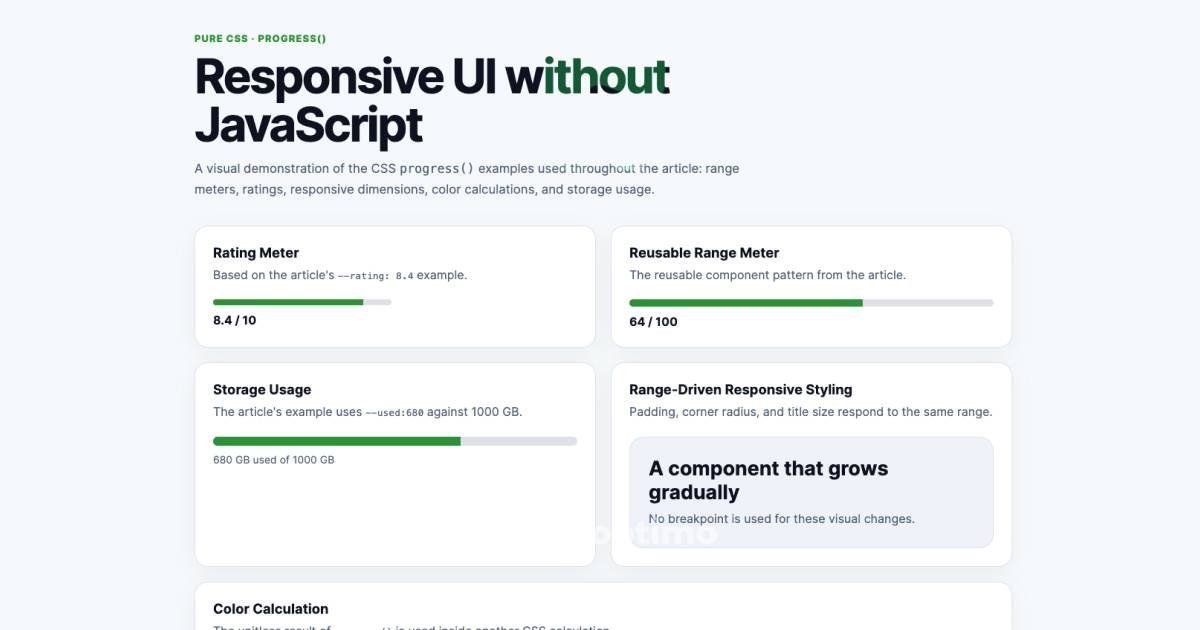
Suppose a product card has a rating represented by a number between 0 and 10.
HTML:
<div class="rating" style="--rating: 8.4;">
  <div class="rating__fill"></div>
</div>
CSS:
.rating {
  width: 240px;
  height: 8px;
  border-radius: 999px;
  background: #e5e7eb;
  overflow: hidden;
}

.rating__fill {
  width: calc(
    progress(var(--rating), 0, 10) * 100%
  );
  height: 100%;
  background: #16a249;
}
Nothing in the component needs to know that 8.4 means 84%.
The relationship is defined in one place:
progress(var(--rating), 0, 10)Change the value to 6, and the meter becomes 60%.
Change it to 9.5, and it becomes 95%.
This is where the function starts earning its place. The code describes the relationship instead of manually converting the number first.
The part that makes it interesting: values do not have to be numbers
progress() is not limited to values such as 20, 50, or 90.
The arguments can also be dimensions or percentages, as long as the values resolve to compatible types.
That opens up a much more interesting use case.
Consider a component that should behave differently as it grows.
.panel {
  --current-width: 680px;
  --small-width: 320px;
  --large-width: 960px;
}
Now CSS can calculate where the current width sits within that range:
.panel__title {
  font-size: calc(
    1.25rem +
    progress(
      var(--current-width),
      var(--small-width),
      var(--large-width)
    ) * 0.75rem
  );
}
The title does not jump at a breakpoint.
It moves through a defined range.
That distinction is useful.
Breakpoints are excellent when a layout genuinely changes mode. They are less attractive when you simply want a property to respond gradually to another value.
One range can control several decisions
This is where I would use progress() in a real design system.
Suppose a card has three visual changes as it grows:
- its internal spacing increases
- its corner radius becomes larger
- its title becomes slightly larger
You can base all three on the same relationship:
.card {
  --size: 680px;
  --size-min: 320px;
  --size-max: 960px;
}

.card__body {
  padding: calc(
    1rem +
    progress(var(--size), var(--size-min), var(--size-max)) * 1rem
  );
}

.card {
  border-radius: calc(
    12px +
    progress(var(--size), var(--size-min), var(--size-max)) * 12px
  );
}

.card__title {
  font-size: calc(
    1.25rem +
    progress(var(--size), var(--size-min), var(--size-max)) * 0.75rem
  );
}
The exact values are design decisions.
The useful part is the relationship.
Instead of creating three unrelated media-query steps, the component can respond continuously within a known range.
That can make a responsive system feel less like a pile of exceptions.
progress() is not a replacement for container queries
This distinction matters.
A container query answers a question like:
“Is this component’s container wide enough to use this layout?”
progress() answers a different question:
“Where is this value between these two limits?”
You can use both together.
For example, a container query might switch a card from a stacked layout to a two-column layout, while progress() controls the gradual changes within each layout.
That is a much better mental model than treating every new CSS feature as a replacement for another one.
Modern CSS is becoming a collection of tools that describe different kinds of relationships.
You can use it for color, too
The output of progress() is a unitless number.
That means it can become an input to another CSS calculation.
For example:
.status {
  --level: 72;
}

.status__indicator {
  background: rgb(
    calc(255 * progress(var(--level), 0, 100))
    calc(255 * progress(var(--level), 0, 100))
    255
  );
}
The color changes as --level moves through the range.
You could use the same idea for:
- dashboard states
- visual intensity
- loading indicators
- data visualization
- responsive decoration
- emphasis levels
But there is an important design warning here.
Just because CSS can continuously change a color does not mean it should.
If the color communicates meaning, accessibility and contrast matter more than making the transition clever.
progress() gives you the calculation. It does not make the design decision for you.
A useful pattern for data-driven interfaces
Here is a more realistic example.
Imagine a storage indicator:
<div class="storage" style="--used: 680;">
  <div class="storage__bar"></div>
  <span class="storage__label">680 GB used</span>
</div>
Suppose the available capacity is 1000 GB.
.storage__bar {
  width: calc(
    progress(var(--used), 0, 1000) * 100%
  );
}
Now the same component can be reused for different values without changing its stylesheet.
The data source could be JavaScript, a server-rendered value, or a framework.
That part has not disappeared.
What has changed is what happens after the value reaches CSS.
Instead of JavaScript calculating:
680 / 1000 × 100and then writing a style, CSS can own the visual conversion.
That separation is often cleaner.
Where calc() still matters
progress() gives you the ratio.
It does not automatically give you the final unit you want.
This is why you will often see it inside calc().
For example:
width: calc(
  progress(var(--used), 0, 1000) * 100%
);
The progress() part answers:
How far through the range are we?The calc() part answers:
How do I turn that ratio into the value this property needs?You can use the same pattern with lengths:
padding-left: calc(
  16px +
  progress(var(--size), 320px, 960px) * 24px
);
Now the padding can move from 16px toward 40px as the source value moves through the defined range.
This combination is one of the most practical ways to use the function.
What happens outside the range?
By default, progress() stops at the boundaries.
Consider:
progress(120, 0, 100)You might expect 1.2.
You get:
1And:
progress(-20, 0, 100)produces:
0That is the default clamping behavior.
For most interface components, this is exactly what you want.
A progress bar should not suddenly become 130% wide because an unexpected value arrived.
But sometimes you deliberately want the calculation to continue beyond the boundaries.
That is where no-clamp comes in:
progress(no-clamp 120, 0, 100)Now the result is:
1.2The same applies below the lower boundary.
It is a small syntax difference, but an important one when building mathematical effects.
There is one mistake I would avoid: calling it a scroll function
You will probably see progress() mentioned alongside scroll-based UI.
That connection is reasonable, but the wording needs care.
progress() does not directly tell CSS how far a page has been scrolled.
Its job is to calculate the relative position of one value between two other values.
Scroll-driven animations are a separate CSS capability.
The two can participate in the same design, but they solve different problems.
Think about it this way:
Something provides a changing value
              ↓
        progress()
              ↓
      visual calculation
              ↓
        CSS property
The function is the calculation step.
That distinction becomes particularly important when you are deciding whether a proposed CSS-only solution is actually possible.
Can this really remove JavaScript?
Sometimes.
Not always.
This is probably the most useful answer to the question behind the title.
If JavaScript currently exists only to perform something like:
const ratio = (value - min) / (max - min);
element.style.width = `${ratio * 100}%`;
then yes, progress() may let you move that calculation into CSS.
But if JavaScript is responsible for obtaining the value in the first place, it still has a job.
For example:
API
 ↓
JavaScript
 ↓
--score: 82
 ↓
CSS progress()
 ↓
visual result
There is nothing wrong with that architecture.
The goal is not to eliminate JavaScript at all costs.
The goal is to avoid using JavaScript as a styling calculator when the browser’s styling system can handle the calculation directly.
A reusable component pattern
You can turn the idea into a small design-system primitive.
<div
  class="range-meter"
  style="
    --value: 64;
    --start: 0;
    --end: 100;
  "
>
  <span class="range-meter__fill"></span>
</div>
.range-meter {
height: 6px;
overflow: hidden;
border-radius: 999px;
background: #e5e7eb;
}
.range-meter__fill {
display: block;
width: calc(
progress(
var(--value),
var(--start),
var(--end)
) * 100%
);
height: 100%;
background: #16a249;
}Now the component does not care whether it represents:
- download progress
- storage usage
- a score
- completion
- a percentage
- a performance metric
The data changes.
The relationship stays the same.
That is where progress() becomes more valuable than the novelty of the syntax itself.
What progress() is good at
I would reach for it when the problem looks like this:
I have a value.
It might be a number, percentage, or compatible dimension.
I have a meaningful lower and upper bound.
There is a real range rather than an arbitrary number.
I want a visual property to respond to that position.
Width, opacity, spacing, scale, color, or another CSS value.
That is the sweet spot.
If those three conditions are not present, another CSS feature may be clearer.
What it does not solve
progress() cannot:
- fetch API data
- manage application state
- listen for arbitrary DOM events
- replace business logic
- perform asynchronous work
- decide what a user’s action means
- magically determine a component’s internal state
And it does not turn CSS into a general-purpose programming language.
That is not a weakness.
CSS is becoming more capable precisely because it is getting better at expressing presentation relationships.
The best implementations will still give each technology the work it is suited for.
Browser support: new enough to use, new enough to check
progress() is currently marked Baseline 2026 by MDN and is listed as newly available across the latest devices and browser versions since September 2026.
That makes it much more interesting for production work than an experimental CSS feature with no meaningful browser coverage.
Still, if your website supports older browsers, progressive enhancement is the sensible approach.
For example, a component can have a conventional fallback:
.meter__fill {
  width: var(--fallback-width);
}
and use progress() where it is supported:
@supports (
  width: calc(progress(50, 0, 100) * 100%)
) {
  .meter__fill {
    width: calc(
      progress(var(--value), 0, 100) * 100%
    );
  }
}
The fallback should match the actual component.
Do not add a complicated compatibility layer simply because a browser can fail to understand one new function. Decide based on your project’s browser-support requirements.
A final way to think about it
CSS has traditionally been very good at describing the final appearance of an interface.
Modern CSS is becoming better at describing relationships between appearances.
A value gets larger, so another value grows.
A component moves through a size range, so its spacing changes.
A score moves toward its maximum, so an indicator fills.
A value crosses a boundary, so the interface changes state.
progress() fits neatly into that direction.
It is not a flashy feature. There is no dramatic new animation API hiding inside it.
It is just a small piece of mathematics made available where developers actually need it.
And that may be why it is worth learning.
The next time you see a few lines of JavaScript calculating a percentage solely to update a CSS property, stop for a moment.
Ask a simpler question:
Does the browser already know enough to calculate this itself?
With progress(), increasingly, the answer is yes.