
GitHub Copilot used to be easy to describe.
You wrote some code, asked a question, accepted a suggestion, and kept working.
That description is becoming less useful.
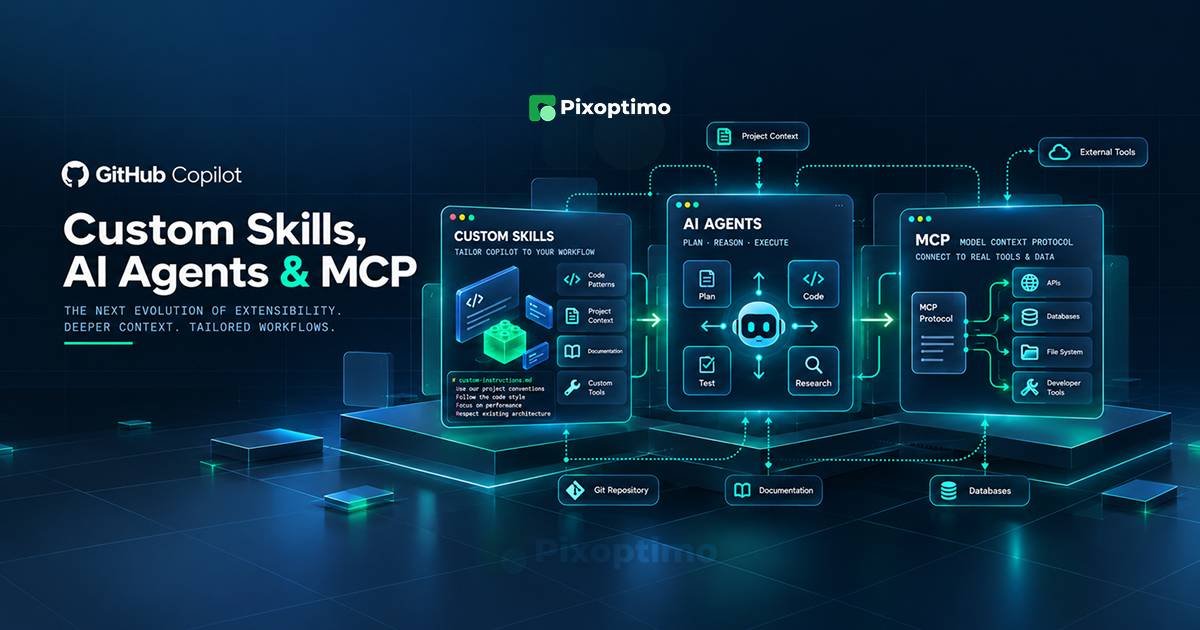
Copilot is moving toward workflows where the model can take on a defined role, follow a reusable procedure, load project-specific knowledge, delegate work, and reach tools outside the repository. GitHub now has several customization mechanisms for doing this, including custom skills, custom agents, and Model Context Protocol (MCP) servers.
The terminology can make these features sound interchangeable. They are not.
A useful way to think about them is to ask three separate questions:
How should Copilot perform this kind of work?
Who should Copilot act as?
What can Copilot reach outside the code it already has?
Those questions lead to skills, agents, and MCP respectively.
That distinction becomes more important as development teams move from asking Copilot for individual code snippets toward building repeatable agent workflows.
Quick Summary
- Custom skills give Copilot reusable instructions, scripts, and resources for a particular type of task.
- Custom agents define a specialist role with its own instructions and available tools.
- MCP servers connect Copilot to external tools and data sources.
- A skill is useful when the task is known but the workflow needs reusable expertise.
- An agent is useful when you want a persistent specialist with a defined role and tool access.
- MCP becomes useful when the agent needs capabilities or information outside the repository.
- These pieces can work together rather than being alternatives.
- GitHub’s recent usage-metrics changes also make customizations more visible to organizations, which makes adoption and governance a more practical concern.
The Simplest Mental Model
Imagine a developer asks Copilot:
“Review this pull request against our accessibility standards and check whether the related design tokens are being used correctly.”
There are several things Copilot might need.
It needs to know the review procedure.
It might need to behave like an accessibility reviewer.
It may also need to look at information that isn’t contained in the code files.
Those are different requirements.
A skill can package the review procedure.
A custom agent can define the reviewer role and the tools that reviewer is allowed to use.
An MCP server can provide access to an external design system, issue tracker, documentation service, database, or another tool.
Once you see the features this way, the terminology becomes much less confusing.
What a Custom Skill Actually Does
A skill is best understood as a reusable piece of task-specific expertise.
GitHub describes agent skills as folders containing instructions, scripts, and resources that Copilot can load when relevant. A skill can include a SKILL.md file and supporting material.
That makes a skill particularly useful for work that follows a recognizable process.
For example, a repository might contain:
.github/
└── skills/
    └── accessibility-review/
        ├── SKILL.md
        ├── checklist.md
        └── examples/
The important part is not the folder name.
It is the fact that the team has turned a procedure that would otherwise be explained repeatedly into something Copilot can reuse.
A frontend team could create skills for:
- accessibility reviews
- release-note generation
- API documentation
- migration checks
- test creation
- security review
- design-system validation
The advantage is consistency.
Instead of telling Copilot every time how the team wants a release note written, the process can live in a reusable skill.
A Skill Is Not the Same Thing as a Custom Agent
This is where the terminology starts to overlap.
GitHub’s own documentation makes the distinction useful: custom agents define specialized versions of Copilot with tailored roles, instructions, and tools, while a skill is more appropriate when the need is a specific task and its associated instructions and resources.
Consider two requests.
Request A:
“Generate release notes using our release-note format.”
That sounds like a skill.
Request B:
“Act as our release manager. Inspect the changes, determine what belongs in the release, check the relevant issues, and prepare the release notes.”
That starts looking like an agent.
The difference is subtle but important.
A skill primarily captures how to perform a kind of work.
An agent establishes a specialist that performs work.
Custom Agents Give Copilot a Job
A custom agent is closer to creating a named specialist inside your development environment.
GitHub describes custom agents as specialized versions of Copilot that can be tailored to particular tasks and workflows. An agent profile can define its purpose, instructions, and available tools, and can also configure MCP servers in supported environments.
Think about the people already present in a software team.
You might have:
- a code reviewer
- a security engineer
- a documentation writer
- a test engineer
- a database specialist
A custom agent lets you encode some of that specialization.
For example, a project could have:
.github/
└── agents/
    ├── security-reviewer.md
    ├── api-reviewer.md
    └── documentation-writer.md
The exact configuration depends on the Copilot surface being used, but the idea is the same: each specialist gets a defined purpose instead of starting from a completely blank conversation.
This becomes especially interesting when agents can delegate work.
GitHub’s current agent model supports subagents, where separate agent contexts can handle delegated work without filling the parent conversation with every intermediate detail.
That is a very different workflow from autocomplete.
MCP Solves a Different Problem
Now consider a different limitation.
Your repository contains the application code, but the information Copilot needs lives somewhere else.
Perhaps the team keeps product requirements in another system.
Maybe design tokens are stored in a design platform.
Perhaps an internal service contains deployment information.
The model needs access to something that is not simply another Markdown file sitting beside the source code.
That is where Model Context Protocol, or MCP, becomes relevant.
GitHub describes MCP servers as a way to provide Copilot with collections of tools for interacting with external services.
The important word here is tools.
MCP is not primarily a better prompt format.
It is a connection layer between the agent and capabilities outside its immediate context.
For example, an MCP server might expose operations that allow an agent to retrieve information from an external system or perform an authorized action there.
That changes what an agent can do.
Put the Three Together
Here is a more realistic development workflow.
A team creates a security-review skill containing its review methodology and supporting resources.
It creates a security-reviewer agent whose job is to inspect code for security issues and whose available tools are deliberately restricted.
The agent is connected through MCP to the systems it genuinely needs.
Now the three pieces have separate jobs:
Skill: the team’s security-review method.
Agent: the security specialist performing the review.
MCP: the bridge to external capabilities.
That is much more useful than thinking of them as three competing Copilot features.
The Difference Between Instructions and Capabilities
There is another distinction developers should keep in mind.
An instruction can tell an agent:
“Check every API endpoint for authentication requirements.”
That does not automatically give the agent a tool capable of inspecting an external API gateway.
Likewise, giving an agent a powerful tool does not tell it how the development team expects that tool to be used.
This creates a useful separation:
Instructions describe behavior.
Skills package reusable task knowledge.
Agents define specialized roles.
Tools provide capabilities.
MCP connects collections of tools to external systems.
GitHub’s customization documentation makes a similar distinction across custom instructions, skills, tools, MCP servers, hooks, subagents, and custom agents.
Once a project grows beyond simple prompting, these boundaries become valuable.
When Should a Developer Start With Skills?
Start with a skill when the problem sounds like:
“We keep explaining the same process to Copilot.”
That is the strongest signal.
Suppose every developer asks Copilot to produce migration notes according to the same internal format.
A skill can turn that repeated explanation into a reusable workflow.
The same approach works for code review conventions, documentation standards, testing procedures, and other repository-specific tasks.
You probably do not need a custom agent simply because a task has a few instructions.
Keep the smallest useful abstraction.
If a reusable task procedure solves the problem, a skill may be enough.
When Does an Agent Make More Sense?
Use an agent when the task has an identity.
Not a personality.
A responsibility.
For example:
“Review database changes before they are merged.”
That is a role.
You may want that reviewer to have specific instructions, access to particular tools, and restrictions on what it can change.
A custom agent is a better fit than adding an enormous collection of instructions to every prompt.
It also makes the workflow easier for other developers to discover and reuse.
MCP Should Come Later Than Many Teams Think
There is a temptation with tool-connected AI systems to connect everything immediately.
That is usually the wrong direction.
If Copilot can already complete a task from the repository and a well-written skill, adding an external tool does not automatically make the workflow better.
MCP becomes worthwhile when the missing capability is genuinely outside the model’s current working environment.
For example:
Repository knowledge missing? Improve the instructions or skill first.
A specialized workflow is missing? Create a skill.
A dedicated role is needed? Create an agent.
External data or an external action is required? Consider MCP.
That sequence keeps the architecture understandable.
Tool Access Is a Security Decision
The moment an agent can call tools, the conversation changes from “What can the model write?” to “What can the model cause to happen?”
GitHub’s documentation recommends reviewing third-party MCP servers and limiting the tools available to what a task actually requires. It specifically recommends allowlisting tools and, where possible, preferring read-only access.
That is not bureaucracy.
Imagine an agent whose only job is to review a pull request.
It probably needs to read repository files.
It might need access to issue information.
It probably does not need permission to delete branches, modify production infrastructure, or send arbitrary external requests.
Giving it those capabilities simply because they are available creates unnecessary risk.
The better design is narrower.
Give the agent the smallest useful toolset.
The New Problem: Too Many Customizations
There is a less obvious problem emerging as these features become easier to create.
A team can end up with dozens of skills, several agents, multiple MCP servers, repository instructions, plugins, hooks, and external integrations.
At that point, customization itself becomes technical debt.
A developer asks Copilot to do something and cannot tell which skill will be loaded, which agent will handle it, or which external tools may become available.
That is not a better AI workflow.
It is a complicated one.
Teams should therefore treat Copilot customization like code.
Give important components clear names.
Keep their purpose narrow.
Document ownership.
Remove experiments that are no longer useful.
Review permissions.
And avoid creating a new abstraction when an existing one already solves the problem.
GitHub’s New Metrics Make This More Interesting
The timing of GitHub’s recent metrics changes is significant.
On October 22, GitHub expanded Copilot usage reporting so organization-created skills, custom agents, MCP servers, slash commands, and plugins can appear by their configured names rather than being lumped into generic other or custom categories. The reports can now include up to 25 entries in each relevant totals_by_* list, compared with five previously.
That sounds like an administrative change.
For engineering organizations, it is more than that.
It means teams can start asking questions such as:
- Which internal skills are actually being used?
- Did developers adopt the new code-review agent?
- Which MCP integrations have meaningful usage?
- Are the customizations we built solving real problems?
- Which ones have become unused configuration?
There is a shift here from “we gave developers AI customization” to “we can observe which customizations are becoming part of the workflow.”
GitHub also warns that these metrics come from client telemetry and can undercount activity, so they should be treated as adoption signals rather than perfect accounting.
What Developers Should Learn First
If you are new to this part of Copilot, resist the urge to learn everything simultaneously.
Start with skills.
They teach an important idea: a development team can package its own procedures for an AI agent instead of repeating those procedures inside prompts.
Then learn custom agents.
Once you understand reusable task instructions, it becomes easier to see why a dedicated role with its own tools and context can be useful.
Learn MCP after that.
MCP is powerful, but its value becomes much easier to understand once you already know what the agent needs to accomplish. Otherwise, it is easy to mistake “more connected tools” for “a better workflow.”
The Bigger Shift in Copilot
The interesting change in Copilot is not that it has accumulated more configuration files.
It is that the unit of interaction is changing.
The old model was roughly:
developer → prompt → answer
The newer model looks more like:
developer → task → agent → skills + tools + external systems → result
That introduces a new engineering discipline.
You have to think about roles, permissions, context, reusable procedures, tool boundaries, and observability.
Those are not traditionally considered “prompt engineering” problems.
They are workflow-design problems.
And that is probably the most useful way to approach GitHub Copilot’s custom skills, agents, and MCP ecosystem.
Don’t start by asking which feature is the most powerful.
Start by asking what your development process is missing.
If the problem is repeated knowledge, build a skill.
If it is specialized responsibility, build an agent.
If it is missing external capability, connect a tool through MCP.
Once those three decisions become clear, Copilot’s expanding agent ecosystem becomes much easier to reason about.